Marketing automation helps you streamline those repetitive tasks based on specific actions or conditions. Instead of hitting “send” on every single message manually, you can set up a system that automatically communicates with your audience at just the right moment.
So, What Is Marketing Automation?
Marketing automation is simply the use of software to take care of common marketing tasks automatically. This includes things like sending emails, segmenting your contacts, assigning leads, reminding folks about important deadlines, or following up with potential customers.
For example, let’s say someone downloads an ebook from your website. Instead of waiting to send them a thank-you email yourself, your automation platform can do it for you right away! A few days later, it might send another email packed with useful info. If the person clicks a link, the system can automatically provide them with even more relevant content. How cool is that?
What Are Marketing Automation Workflows?
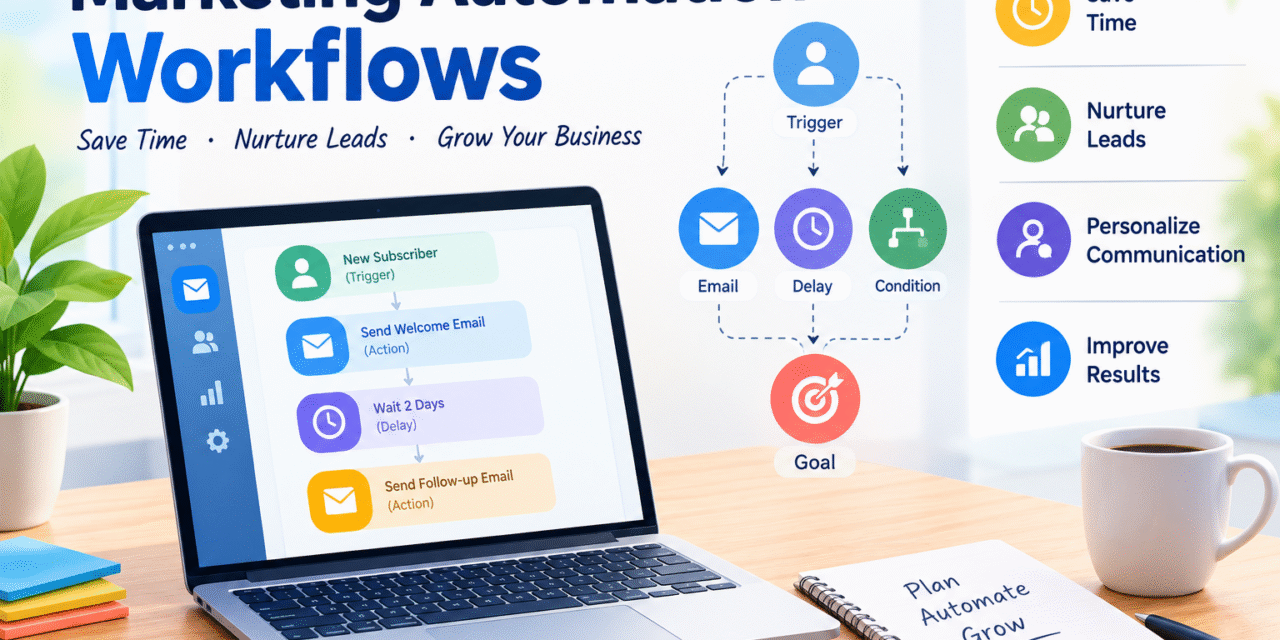
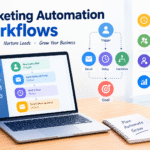
A marketing automation workflow is like a magical chain reaction of actions that happens when a specific trigger occurs. A “trigger” is an event that starts everything rolling, and there are plenty of common triggers, like:
– A new subscriber joins your email list
– A visitor fills out a form
– A customer makes a purchase
– Someone downloads a lead magnet
– A person clicks a link in your email
– A contact reaches a certain stage in your sales process
After that trigger, the system follows your custom rules to perform one or more actions. For instance, if a visitor submits a form, the workflow might look like this: Visitor submits form → Welcome email → Wait 2 days → Educational email → Wait 3 days → Product recommendation. It’s like having a helpful assistant that keeps everything moving smoothly for you!
Why Are Automation Workflows Important?
Let’s talk about why automation workflows can be a game-changer for your marketing efforts:
1. Save Time: We all know that business can be time-consuming, especially with repetitive tasks. Automation swoops in to save the day, taking care of those tasks so you can focus on strategy and creativity.
2. Improve Follow-Up: When someone shows interest, quick follow-ups can make a big difference. With an automated workflow, you can send timely messages without waiting for a team member to jump in.
3. Nurture Your Leads: Remember, not every visitor is ready to buy right away. Automated emails can provide helpful information over time, building that all-important trust with potential customers.
4. Personalize Communication: You don’t have to send the same message to everyone. With automation, you can create tailored workflows based on customer interests, behaviors, and past purchases, making your communication feel much more personal.
5. Create Consistent Customer Experiences: Automation makes it easier for your customers to receive important communications at the right points in their journey with you.
Fun Examples of Marketing Automation Workflows
There are countless ways to put automation to work for you. Here are some friendly examples to get you started:
1. Welcome Email Workflow:
– When someone signs up for your email list, send them a warm welcome email right away!
– Follow up with a useful educational email two days later.
– After three days, share a relevant product or service they might love.
2. Lead Magnet Workflow:
– If you offer an ebook or checklist, create a workflow surrounding its download.
– Start with a download confirmation email and then send helpful content related to the topic over the following days. Finally, introduce your product or service.
3. Abandoned Cart Workflow:
– For e-commerce businesses, set up reminders for shoppers who left items in their cart.
– Send a friendly reminder a few hours later, followed by another email with additional details or a special offer to encourage them to complete their purchase.
4. Customer Onboarding Workflow:
– After a purchase or a sign-up, send onboarding emails that will guide new customers on how to get started, give tutorials, and answer common questions.
5. Re-Engagement Workflow:
– If some subscribers stop interacting with your emails, don’t be too quick to remove them. Instead, send a friendly message checking in to see if they still want to hear from you. If they remain inactive after a few chances, then you can think about cleaning up your list.
By embracing marketing automation workflows, you can create a friendly, organized, and efficient marketing experience for both you and your audience. Happy automating!
How to Create a Friendly and Effective Workflow
Creating an automated workflow can be a breeze! Just start with a clear aim, and let’s break it down step by step.
Step 1: Define Your Goal
Think about what you want your workflow to accomplish. Are you looking to generate leads, make a sale, greet new subscribers, or perhaps educate your customers? Whatever it is, keep your goal in mind!
Step 2: Identify the Trigger
Next up, choose what action will kick things off. For instance, you might want a welcome sequence to start when someone fills out a form.
Step 3: Plan Your Messages
Think about what information your customers will need at each stage. It’s best to avoid overwhelming them with too many promotional messages—keep it helpful!
Step 4: Add Timing
Incorporate small breaks between your messages. This way, your subscribers have a chance to read and engage with your content without feeling rushed.
Step 5: Use Conditions
Get a bit creative! You can set up different paths based on how your customers behave. For example, if someone clicks a specific link, they can receive extra info on that topic.
Step 6: Test Your Workflow
Before hitting that activate button, always do a little test run. Check your emails, links, timing, conditions, and how the subscriber experience feels. This is a crucial step!
Step 7: Monitor Performance
Keep an eye on key metrics like email opens, clicks, conversions, unsubscribes, and sales. This feedback is gold—it helps you fine-tune and improve your workflow.
Best Practices to Follow
Great automation should be a helpful friend, not an annoyance. Make sure your emails are relevant and packed with useful information. Use clear subject lines and straightforward calls to action. And remember, it’s better to avoid bombarding your subscribers with too many emails in a short time.
Segmentation is another fantastic tool! When you can, tailor content to match your audience’s interests. Also, don’t forget to periodically review your automations; what worked six months ago might need a little refresh as your audience or goals evolve.
Final Thoughts
Marketing automation workflows are a fantastic way for businesses to save time, enhance follow-up, and build stronger connections with customers. There’s no need to dive into complicated systems right away.
Start with a simple workflow, like a welcome email sequence or a lead magnet follow-up. Once you get the hang of triggers, actions, delays, and conditions, you can gradually expand into more sophisticated automations.
Always keep the customer experience at the forefront. Automation should enhance communication, making it more timely and relevant—not just about sending more emails. When done right, automation can be a key player in your digital marketing success!






Your writing style is so engaging and easy to read It makes it a pleasure to read your blog and…
I was more than happy to search out this net-site.I needed to thanks for your time for this excellent learn!!…
Usually I do not read article on blogs, but I would like to say that this write-up very compelled me…
Hello, i believe that i noticed you visited my website thus i came to “return the choose”.I'm attempting to find…
Thanks for sharing. I read many of your blog posts, cool, your blog is very good.